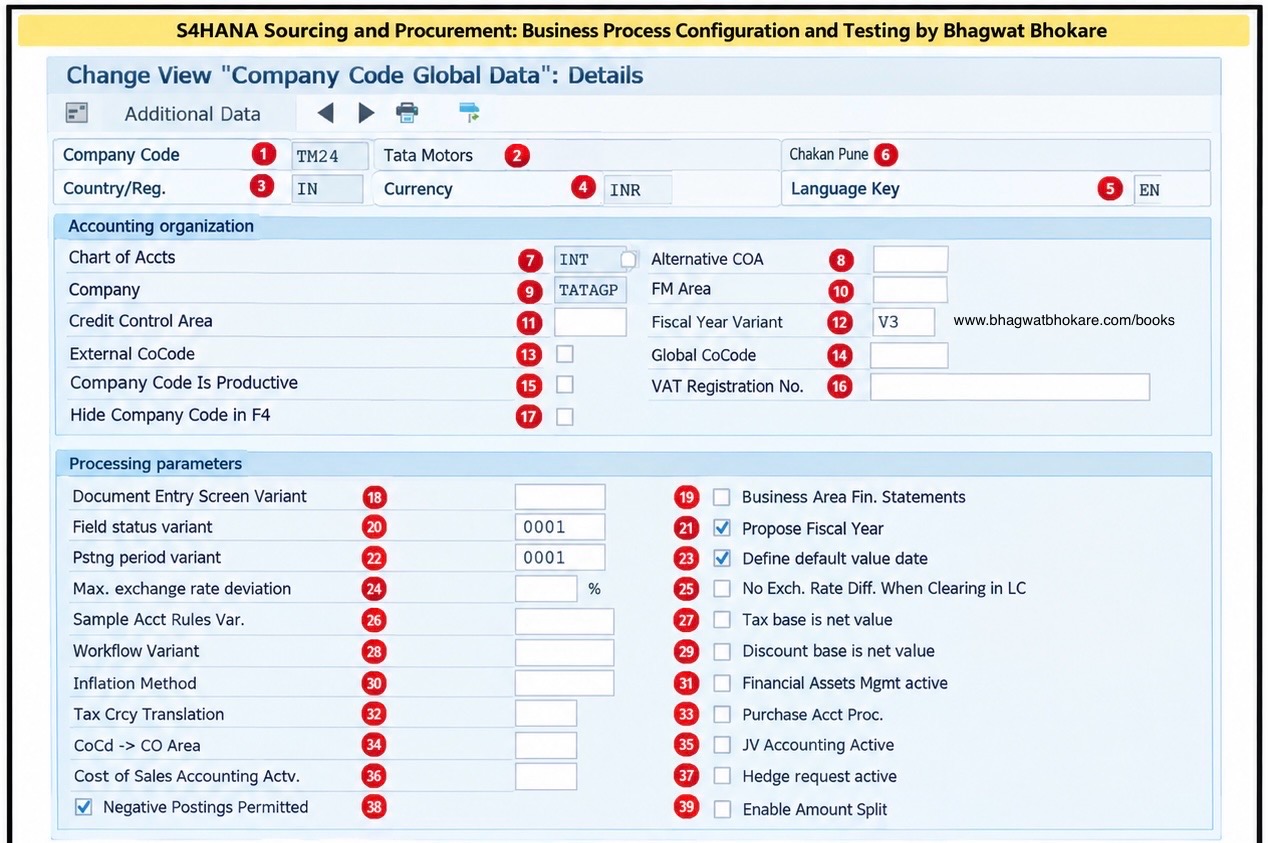
These settings are maintained in Company Code Global Data and control important FI behavior at company-code level.
General Information
1. Company Code
A unique 4-character ID representing a legal accounting entity in SAP.
Example: TM24
2. Company Name
The name assigned to the company code.
Example: Tata Motors
3. Country/Region
Defines the country/region of the company code and influences country-specific processing such as tax and reporting.
4. Currency
The local/company-code currency used for accounting.
Example: INR
5. Language Key
Defines the language used for various company-code-related outputs and processing.
6. Company Code Description / Location
The descriptive information displayed for the company code.
Note: the exact availability/use of this displayed field can depend on the SAP screen/version or enhancement.
Accounting Organization
7. Chart of Accounts
Defines the G/L account structure used by the company code.
Example: INT
All relevant G/L accounts used by the company code come from this chart of accounts.
8. Alternative COA
An alternative/local chart of accounts can be assigned when additional country-specific or statutory G/L account structures are required.
9. Company
Links the company code to a higher-level Company entity, mainly for group/company-level reporting.
10. FM Area
Links the company code to a Funds Management Area, when Funds Management is used.
11. Credit Control Area
Determines the organizational unit responsible for credit management. A credit control area can cover one or multiple company codes.
12. Fiscal Year Variant
Defines how calendar dates are mapped to fiscal years and posting periods.
Example: V3.
13. External CoCode
Indicates that the company code is treated as an external company code in relevant SAP scenarios.
14. Global CoCode
Used for specific global/company-code relationships and consolidation-related scenarios.
15. Company Code Is Productive
Indicates that the company code is productive. This can be relevant for system/configuration controls where SAP distinguishes productive company codes.
16. VAT Registration No.
Stores the VAT registration number of the company code where applicable. It can be used in tax processing, reporting and document forms.
17. Hide Company Code in F4
Controls whether the company code should be hidden from F4/input-help selections.
Processing Parameters
18. Document Entry Screen Variant
Controls the screen layout/variant used when entering accounting documents.
19. Business Area Fin. Statements
Indicates whether financial statements are to be managed/reported by Business Area.
20. Field Status Variant
Controls which fields are required, optional, suppressed or display-only when posting to G/L accounts.
Example: 0001.
21. Propose Fiscal Year
Allows SAP to propose the fiscal year based on the relevant posting/document date.
22. Posting Period Variant
Controls which accounting periods are open or closed for posting for the assigned company code.
Example: 0001.
23. Define Default Value Date
Controls defaulting behavior for the value date during relevant accounting postings.
24. Max. Exchange Rate Deviation
Defines the permitted deviation between an exchange rate entered during document processing and the relevant exchange rate maintained in the system.
25. No Exch. Rate Diff. When Clearing in LC
Controls exchange-rate-difference behavior when foreign-currency open items are cleared in local currency. When activated, SAP can use the local-currency amount already stored in the open item instead of recalculating it.
26. Sample Acct Rules Var.
Specifies the variant used for sample account rules, where applicable.
27. Tax Base Is Net Value
Controls whether the tax base is calculated from the net value rather than the gross value in relevant transactions.
28. Workflow Variant
Determines the workflow variant used for relevant financial accounting processes.
29. Discount Base Is Net Value
Controls whether cash discount calculation uses the net amount as its base.
30. Inflation Method
Specifies the inflation accounting method where inflation accounting is applicable.
31. Financial Assets Mgmt Active
Activates the relevant Financial Assets Management functionality for the company code where supported/required.
32. Tax Crcy Translation
Controls relevant tax currency translation behavior for the company code.
33. Purchase Acct Proc.
Controls whether the relevant purchase account processing functionality is active for the company code.
34. CoCd → CO Area
Controls the relationship/assignment between the Company Code and Controlling Area. This relationship is fundamental for FI-CO integration.
35. JV Accounting Active
Activates Joint Venture Accounting functionality for the company code where JVA is used.
36. Cost of Sales Accounting Actv.
Activates Cost-of-Sales Accounting, which supports reporting expenses according to their functional purpose, such as production, sales or administration.
37. Hedge Request Active
Activates functionality related to hedge requests/hedge management where applicable.
38. Negative Postings Permitted
Allows negative postings at company-code level. Negative postings can be used in certain correction/reversal scenarios to reduce the transaction figures rather than simply creating an opposite normal posting.
39. Enable Amount Split
Activates amount-splitting functionality for relevant processes where an amount needs to be split according to configured rules.
Important SAP Consultant Point
Don’t treat all 39 fields as fields that you manually configure in every implementation.
Some are mandatory/core organizational settings such as:
Company Code → Currency → Chart of Accounts → Fiscal Year Variant → Field Status Variant → Posting Period Variant → CO Area
Others are optional and scenario-specific, such as:
FM Area → JV Accounting → Hedge Request → Inflation Method → Cost of Sales Accounting → Amount Split
So, in a real implementation, the consultant should determine which settings are required based on the business scope, country, SAP release and activated functionality, rather than simply filling every field.
Latest Posts
- SAP Project Terminologies Every Consultant Should Know
- What’s the Difference between Greenfield, Brownfield and Bluefield Implementation in SAP?
- What Is Document Splitting SAP S4HANA?
- SAP Global Certification Codes: Complete Guide to SAP Modules and Exams
- How to Access SAP Practice System on SAP Learning Hub?
Leave a Reply